
Speck
SINGLE PIXEL — *the atomic unit. every image is a grid of these. one pixel is a choice.*
Listen along — Speck
Loading audio…
Press play to listen along. The line being read lights up as you go.
Show full transcript
Loading transcript…
Chapter 1 — Speck and the Choice of One Square
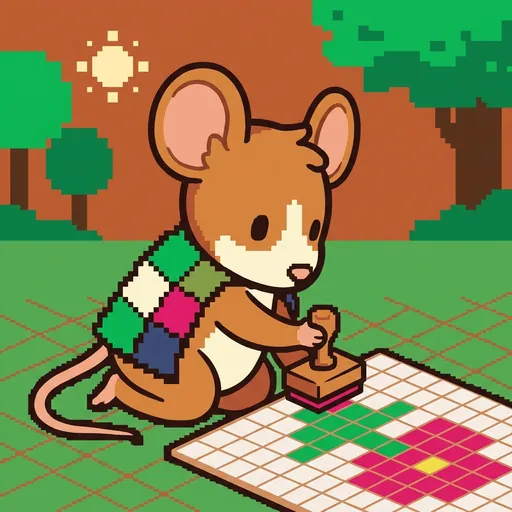
Speck was a small mouse-tween. She had soft, chunky-cartoon ears and warm brown-and-cream fur. A tiny cape made of patchwork pixels fluttered behind her. Each square on the cape was a different bright color. In her paw, Speck carried her special tool: a small wooden pixel-stamp. This stamp placed exactly one colored square at a time. Speck used it to build whole pictures, one tiny square after another. She showed everyone how pixel art was built from these single, careful choices.
Speck was very patient about tiny things. She loved to say, “Every image is a grid of these. One pixel is a choice.” Her pixel-stamp was her favorite thing. It was how she showed the world her special art.
Lots of people think pixel art is just blurry pictures. But Speck knew it was much more than that. It was a special kind of art where every single pixel was placed on purpose. Every picture was a grid of careful choices. One pixel was a choice: what color it would be, where it would sit, and how it looked next to its neighbors. Speck’s whole job was to make this clear. She wanted everyone to see that every tiny choice mattered. She made it easy to understand how to place pixels on purpose.
Speck always said, “Every image is a grid of these. One pixel is a choice. When you place a pixel, you pick its color and where it goes. If you don’t place one, that’s also a choice. Empty spots are important too. They are part of the picture’s design.”
Speck taught everyone about the single pixel. She explained the simple rules:
- A pixel is a picture element. It’s the smallest piece of any picture. Think of it as one tiny colored square. It has a spot on the picture and a color.
- The grid is like your canvas. Pixels always fit neatly on this grid. No half-pixels allowed! The grid size makes the picture bigger or smaller. Common sizes are 16x16 or 32x32 squares.
- Color is a big choice. You pick colors from a special box, called a palette. Each pixel gets just one color.
- Empty pixels matter. Clear spots or background pixels are part of the design too. They help shape the picture.
- Picture size is important. Small pictures, like 8x8 squares, mean you have to be super careful with each choice. Bigger pictures, like 64x64, give you more room.
- Don’t worry about being perfect! Your first pixels might look a little wonky. That’s totally normal. Every pixel you place teaches you something new.
- Always zoom out. You might place pixels up close. But always step back to see the whole picture. Pixel art looks best when you see it from far away.
Speck grew up in the village granary. It was a big, cozy place, always smelling of fresh grain. Her family had been the village seed-counters for generations. They were the mice who carefully counted and sorted every single grain. One by one, they taught their children that tiny things, put in the right spots, build up to large patterns. They learned that “every grain counts.” Speck remembered that lesson. She knew that “every pixel counts,” too.
When Speck was twelve, she walked all the way to PixelForge. It was a big, exciting place where all kinds of artists worked. Palette, her teacher, met her at the door. “What is the single pixel?” Palette asked.
Speck stood tall. “It’s the smallest piece,” she said. “Every image is a grid of these. One pixel is a choice. Put each one where you mean it. The picture will show up.”
Palette smiled. “You’re the one!” she said.
In her workshop, Speck loved to show how it all worked. Her workshop was a cozy nook, filled with soft light. Tiny colored squares were scattered on her worktable. A large, glowing screen hung on the wall. It was her canvas. She held up her pixel-stamp. It was smooth wood, perfectly sized for her paw.
“Watch,” she said. She pressed the stamp gently onto the screen. Click! A small brown square appeared. It glowed softly. “That’s the start of a tree-trunk,” she explained.
She moved her paw a tiny bit. Click! Another brown square appeared, right next to the first. “More trunk,” she mumbled. She paused, looking closely. “Hmm, maybe that one is a bit too far right.” She carefully nudged it over. It snapped into place.
Then she picked a bright green square from her color palette. Click! A green square appeared above the brown. “Leaf,” she said, nodding. She added another green one, then another.
Slowly, one pixel at a time, a small tree began to emerge on the screen. It was a bit wobbly at first, just a few squares. Speck would place a pixel, then tilt her head. She would zoom out on the screen to see the whole picture. Sometimes, she would frown. She’d carefully remove a pixel and place a new one, just a tiny bit to the left or right.
“Each pixel is a choice,” Speck said, looking at the growing tree. “Most pixels look a bit wrong-ish on the first try. That’s fine. You just adjust it. You replace it if you need to. The picture grows through all your choices and changes.”
She pointed to the screen. “See? The image emerges through choices and corrections.” She looked up, her eyes bright. “I am Speck. The big idea I teach is the single pixel. My main rule is: place it on purpose, check the whole picture, then fix it carefully.”
Speck smiled gently. “Don’t expect your first pixel art to look like a super famous artist’s work,” she said. “Pixel placement is a skill you learn. It takes practice. Every picture you make teaches you something new for next time.”
“One pixel is a choice. The image emerges from choices.”
The PixelForge ensemble
Speck is part of PixelForge's distributed-narrative cast. Each character embodies a different curricular primitive; together they teach the full subject.
-

Shade
The palette ramp — a small set of colors arranged from darkest to lightest (the foundation of pixel-art shading and form)
-
Grid
The tilemap grid — pixels snapped to repeating units that form tiles, tilesets, and game maps
-
Tween
The in-between frame — the animation frame that sits between two keyframes, giving motion its smoothness
-

Banner
The impact pose — the heroic / dramatic silhouette that reads instantly at thumbnail size (the principle that good character art is recognizable from its outline alone)
-

Stipple
Dithering — scattering two colors in a checker pattern so your eye blends them into a third; how pixel artists fake a smooth gradient with a tiny palette
-
Feather
Anti-aliasing — tucking a few in-between pixels along a jagged edge so a curve reads smooth instead of like a staircase
-

Sheen
Light source and form shading — choosing where the light comes from, then placing highlights and shadows so a flat shape turns round
-
Rim
Selective outlining — drawing the edge only where a sprite would get lost, so it pops from the background without looking boxed-in
-

Cycle
Color-cycling animation — making water and fire flow by shifting which colors sit in the palette slots, without moving a single pixel
-

The Sprite
A finished character sprite coming to life — how placed pixels, a color ramp, chosen light, a clean outline, and smoothed edges layer together into one whole little hero